
Introduction
The excitement surrounding the release of the Nintendo Switch 2 is palpable among gaming communities worldwide. Gamers everywhere are diving into high-fidelity titles while on the bus, train, or airplane. Yet, this newfound power brings a familiar challenge to the forefront. The question of switch 2 battery life remains a primary concern for users who value portability. Modern games demand significant processing power. Consequently, the battery faces a heavier load than ever before. Understanding how to manage this resource is essential. It ensures that your gaming sessions remain uninterrupted by the dreaded low-power indicator.
Furthermore, battery technology has not kept pace with advancements in processing speed. Lithium-ion batteries have limitations. Therefore, users must adopt smart habits to maximize their device’s potential. Many factors influence how long your console lasts between charges. These factors range from screen brightness to the complexity of the game you are playing. Heavy titles consume power rapidly. In contrast, indie games or retro titles are much gentler on the battery. Therefore, managing your expectations and settings is key. This article aims to educate you on the best practices for power management. We will provide a comprehensive guide to extending your playtime.
Moreover, proper battery care extends the lifespan of the device itself. A well-maintained battery retains its capacity for years. Conversely, poor charging habits can degrade the battery quickly. This degradation leads to shorter playtimes and frustration. Thus, this guide serves a dual purpose. We want to help you extend your daily gaming sessions. We also want to ensure your console remains healthy for its entire lifecycle. By following these essential tips, you will master the art of power management on your new console. You will become an expert in optimizing your setup.
Understanding the Technology Behind the Power
To truly optimize your gaming experience, you must first understand the hardware. The Nintendo Switch 2 utilizes advanced lithium-ion battery technology. This is the industry standard for portable electronics. These batteries are favored for their high energy density. They can store a significant amount of power in a relatively small space. However, they are not without their quirks. The switch 2 battery life is determined by the capacity of the cell and the power draw of the system. The system includes a powerful new processor. This processor allows for stunning graphics and smooth gameplay. Consequently, it requires more energy to operate compared to its predecessor.
Furthermore, the console features an improved cooling system. This system prevents overheating during intense gaming sessions. While essential for performance, the cooling fan also draws power. Therefore, graphically demanding games cause the fan to spin faster. This action results in increased power consumption. The display is another major factor. The new screen is larger and brighter. It likely features higher resolution and refresh rates. All these visual enhancements drain the battery more quickly. Thus, the hardware itself dictates the upper limits of your playtime. You cannot change the hardware capacity easily. But, you can control how efficiently the software uses that power.
Additionally, the battery chemistry involves complex reactions. Heat is a major enemy of these chemical reactions. Excessive heat can permanently damage the battery cells. This damage reduces the total capacity over time. Therefore, thermal management is directly linked to battery health. Nintendo has likely integrated safeguards to prevent overheating. However, users play a role too. Keeping vents clear and avoiding hot environments helps significantly.
Essential Display Settings to Extend Usage
The screen is often the biggest consumer of power in any portable device. The Nintendo Switch 2 is no exception to this rule. Therefore, adjusting your display settings is the most effective way to extend your playtime. You should start with the brightness slider. Auto-brightness is a useful feature. It adjusts the screen based on ambient light. However, manual adjustment often yields better power savings. You should lower the brightness to the lowest comfortable level. Even a small reduction can save precious minutes of gaming. This is especially true in darker environments. There is no need for maximum brightness indoors.
Furthermore, you should consider the screen resolution. The Switch 2 likely supports high-definition output. While beautiful, pushing all those pixels requires significant energy. Many games allow you to adjust the resolution in handheld mode. Selecting a lower resolution can drastically reduce the strain on the battery. The visual difference might be negligible on a small screen. Yet, the battery savings are substantial. You should also check the refresh rate. A higher refresh rate provides smoother motion. But, it also updates the image more frequently. This constant updating consumes more power. Switching to a standard 60Hz or lower refresh rate can help conserve energy.
Another critical setting is the screen timeout. You should set your screen to turn off quickly when idle. If you set the console down for a moment, the screen should dim and then shut off. This prevents unnecessary power drain during breaks. Many gamers leave the screen on while looking up guides or taking a call. This habit wastes battery. Therefore, utilizing the sleep mode function is vital. A quick press of the power button locks the console.
Optimizing System Settings for Maximum Efficiency
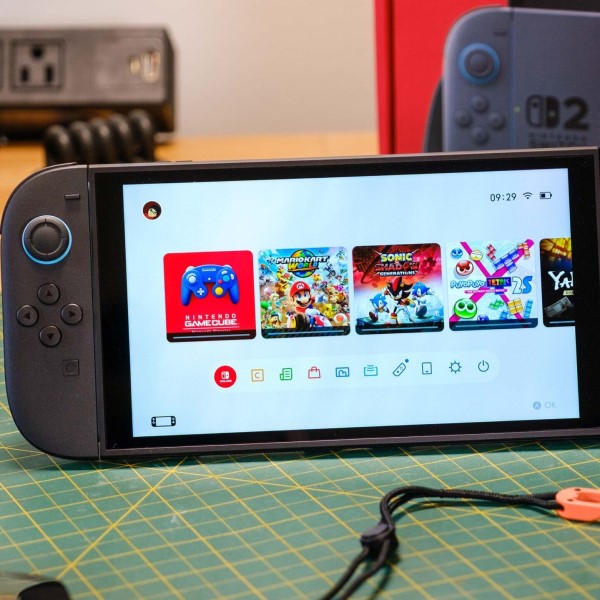
Beyond the display, the console’s internal system settings play a pivotal role. These background processes can silently eat away at your battery. Therefore, a thorough audit of your system settings is necessary. You should start by disabling features you are not currently using. For instance, Wi-Fi and Bluetooth connectivity are major power drains. If you are playing a single-player game offline, you can turn on Airplane Mode. This single action disables all wireless communications. It instantly stops the console from searching for signals. The switch 2 battery life benefits immensely from this simple toggle. The console no longer expends energy maintaining a connection.
Moreover, haptic feedback and vibration can be power-hungry features. The advanced rumble features in modern controllers use motors. These motors consume electricity with every vibration. While immersive, they are not always necessary. You should consider lowering the vibration intensity or turning it off completely. This is particularly effective for games with constant rumble. Additionally, you should manage volume levels. Loud volume through the speakers uses more power. Using headphones is a more energy-efficient way to enjoy game audio. Headphones require far less power than driving internal speakers. Thus, this small change can lead to longer play sessions.
Finally, you should check for background applications. The Switch 2 may allow for multitasking or downloads in the background. These processes keep the processor active. They prevent the system from entering a low-power state.
Best Charging Practices for Long-Term Health
How you charge your device is just as important as how you use it. Many myths surround battery charging. Following outdated advice can actually harm your battery. Therefore, understanding modern charging practices is essential for longevity. You do not need to drain the battery to 0% before charging. In fact, you should avoid doing this. Lithium-ion batteries prefer partial discharge cycles. Keeping the battery between 20% and 80% is often cited as the optimal range. This practice reduces stress on the battery cells. Consequently, the switch 2 battery life will remain healthy for a longer period.
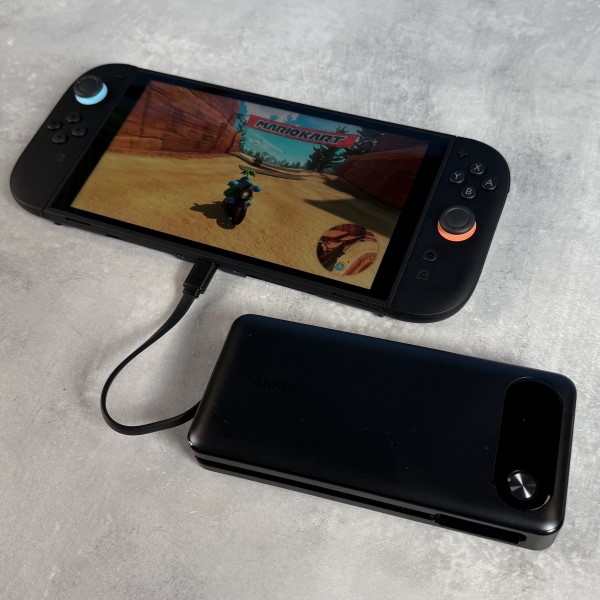
Furthermore, heat is generated during the charging process. This heat can be damaging if not managed correctly. You should avoid playing graphically intensive games while charging. This activity combines the heat of the processor with the heat of the battery. It can push the system temperature to unsafe levels. Instead, you should let the console rest while it charges. If you must play, choose less demanding titles. Additionally, you should use the correct charger. Nintendo likely recommends a specific wattage for optimal charging speed. Using a third-party charger with higher power output might generate excess heat. It is safer to stick to licensed accessories. This ensures the charging speed matches the battery’s specifications.
Moreover, long-term storage requires specific preparation. If you plan to not use the console for a while, do not leave it fully charged or empty. A full charge places the battery under stress. An empty charge might cause the battery to fall below a critical voltage level.
Selecting the Right Games for Portable Play
Not all games are created equal when it comes to power consumption. The software you choose to run dictates the workload on the processor. High-end AAA titles push the hardware to its limits. They utilize complex physics, detailed textures, and advanced lighting. This requires the processor to run at high speeds. Consequently, the battery drains much faster. You may notice that playing a graphically intense game yields only a few hours of play. This is normal behavior for a powerful handheld. However, it impacts your portable gaming plans. Therefore, being selective with your library helps manage expectations.
On the other hand, indie games and 2D platformers are much kinder to the battery. These titles often have simpler graphics. They require less processing power to run. As a result, the processor can run at a lower frequency. It generates less heat and consumes less electricity. You might find that playing these lighter games doubles your battery life compared to AAA titles. Therefore, if you are embarking on a long trip, you should pack a variety of games. You can save the heavy hitters for when a charger is nearby. You can play the lighter titles when you are truly off the grid.
Furthermore, you can often adjust in-game settings. Many modern ports allow you to tweak graphical fidelity. You might be able to turn off shadows or lower texture quality. These sacrifices often lead to a more stable frame rate and better battery life. You should explore the settings menu of each game you play. You might find a “battery saver” or “performance” mode. These modes are designed specifically for handheld play.
Frequently Asked Questions
How long does a Switch 2 battery last?
The duration depends entirely on the game being played. For graphically demanding titles, you can expect between 2.5 to 4.5 hours. For lighter indie games or basic applications, the battery can last up to 7 or 8 hours. Nintendo estimates a range of 3 to 6 hours for average use. However, your specific settings will influence this number. Higher brightness and volume will reduce this time. Conversely, power-saving settings can push it to the upper limits.
Will leaving the Switch 2 docked ruin the battery?
No, modern consoles are designed to handle being docked. The system uses smart circuitry to stop charging once the battery reaches 100%. It then runs off power from the dock. However, keeping the battery at 100% for weeks on end can cause minor stress to the cells. If you plan to store the console for a long time, it is better to undock it. But for daily use, docking it overnight is perfectly safe and will not ruin the battery.
Is the Switch 2 battery better than the Switch?
Yes, the Switch 2 features a larger capacity battery to compensate for more powerful hardware. While the absolute battery life for AAA games might seem similar, the console is doing much more work. The Switch 2 offers significantly longer playtimes for games that would drain the original Switch quickly. It also supports faster charging technologies. Therefore, while it may not last days on a single charge, it is more efficient relative to its performance output.
Conclusion
Mastering the art of battery management ensures that your gaming never stops. The Nintendo Switch 2 is a marvel of portable engineering. Yet, its potential is limited by its power source. By implementing the strategies discussed, you can significantly improve your switch 2 battery life. You can optimize your display settings to reduce unnecessary drain. You can manage your system settings to minimize background power usage. Furthermore, you can adopt healthy charging habits to prolong the battery’s overall lifespan. These small changes add up to a much better user experience.
Ultimately, the goal is to play without anxiety. You want to explore vast worlds and solve complex puzzles without watching the battery meter tick down. With a mindful approach to software selection and system settings, this is achievable. You hold the power in your hands. By following this guide, you ensure that your console remains a reliable companion for years to come. Embrace these habits today. You will see a noticeable difference in your daily gaming life.