
Understanding the Core Architecture of Mobile Security
The debate over mobile security has never been more critical. We store our entire lives on smartphones. Consequently, understanding the fundamental differences between these two operating systems is essential. When users discuss android vs ios security, they often focus on surface-level features. However, the real distinction lies deep within the core architecture. Apple’s iOS operates on a closed ecosystem model. This means Apple controls both the hardware and the software tightly. Therefore, the company can enforce strict security protocols from the ground up. In contrast, Android operates on an open-source model. Google provides the base code, but manufacturers modify it. This fragmentation creates a diverse range of user experiences. Unfortunately, it also creates varying levels of security across different devices.
Furthermore, the codebase accessibility plays a major role. Android’s open-source nature allows developers to inspect the code. This transparency helps in identifying vulnerabilities quickly. However, it also allows malicious actors to study the code for exploits. Conversely, iOS uses a proprietary “walled garden” approach. Apple does not release its source code to the public. This “security by obscurity” makes it harder for hackers to find weaknesses. Additionally, Apple designs its own custom silicon chips. These chips include dedicated security features like the Secure Enclave. This hardware-software integration provides a robust defense layer. Therefore, iOS often gains an initial advantage in the security race.
Moreover, the file system structure differs significantly. iOS uses a sandboxing technique for all apps. Each app runs in its own isolated environment. Consequently, one app cannot access the data of another app easily. This prevents malware from spreading across the system. Android also utilizes sandboxing. Nevertheless, the system allows for more flexibility. Users can grant apps extensive permissions. If a user makes a poor decision, the system becomes vulnerable.
App Store Policies and Malware Prevention Strategies
The method of app distribution is a primary defense line. It significantly impacts the safety of your device. Consequently, this is a focal point in the android vs ios security discussion. Apple maintains a notoriously strict App Store review process. Every app undergoes rigorous human review before publication. Apple verifies the developer’s identity and scans the code for malware. Therefore, the likelihood of downloading a malicious app is extremely low. This centralized control ensures a high standard of quality. It effectively keeps most threats at bay. Users feel safe downloading apps from the official store.
On the other hand, Google employs a different strategy. The Google Play Store uses automated systems to scan apps. Google Play Protect runs continuously on devices. It checks apps for harmful behavior, even after installation. However, the initial review process is less strict than Apple’s. This allows for faster app approval. But it also means some malicious apps occasionally slip through the cracks. Furthermore, Android allows users to install apps from third-party sources. This feature is called “sideloading.” While it offers freedom, it introduces significant risks. Users might unknowingly install malware from untrusted websites. Consequently, the open nature of Android requires more user vigilance.
Additionally, the volume of malware differs between platforms. Historically, Android faces a much higher volume of malware attacks. This is due to its massive global market share and open ecosystem. Cybercriminals often target Android users through fake apps. In contrast, iOS malware is exceedingly rare. When iOS malware appears, it is often highly sophisticated and state-sponsored. For the average user, the risk on iOS remains minimal.
The Critical Role of Timely Software Updates
Software updates serve as the primary shield against new threats. They patch vulnerabilities and fix bugs. Consequently, the speed of update delivery is crucial. This is where the iOS architecture shines. Apple controls both the hardware and software directly. Therefore, the company can push updates to almost all compatible devices simultaneously. When a security flaw appears, Apple fixes it quickly. Users receive a prompt to install the update. This uniformity ensures that the majority of iOS devices run the latest, most secure version. As a result, the “patching gap” is very small. This is a significant advantage in the android vs ios security comparison.
Conversely, the Android ecosystem suffers from fragmentation. Google releases the latest version of Android. However, manufacturers like Samsung, OnePlus, and Xiaomi must adapt it for their devices. They add their custom user interfaces. This process takes months. Consequently, many Android phones run on outdated software. Carriers also play a role in delaying updates. They must certify the updates for their networks. This multi-step process leaves users vulnerable for extended periods. While Google Pixel phones receive updates promptly, other devices lag behind. This delay gives hackers a larger window of opportunity to exploit known flaws. Thus, the update mechanism is a critical differentiator.
Furthermore, the lifespan of support matters. Apple typically supports iPhones for five to six years. Older devices continue to receive critical security patches. This longevity keeps older phones safe. In contrast, Android support varies wildly. Some manufacturers offer only two or three years of updates. Budget phones might receive even fewer updates. Once support ends, the device becomes a sitting duck for new exploits.
Privacy Features and Data Tracking Controls
Privacy is a major component of modern mobile security. Users want to control who sees their data. Consequently, privacy features have become a battleground. Apple has positioned itself as a champion of user privacy. The introduction of App Tracking Transparency (ATT) changed the game. This feature forces apps to ask for permission before tracking user activity. Users can easily deny this access. Therefore, apps like Facebook can no longer track users across other apps and websites easily. This move severely impacted the data brokerage industry. It gave users more power over their digital footprint. Additionally, iOS displays a clear privacy report. This report shows how often apps access sensitive data like the camera or microphone.
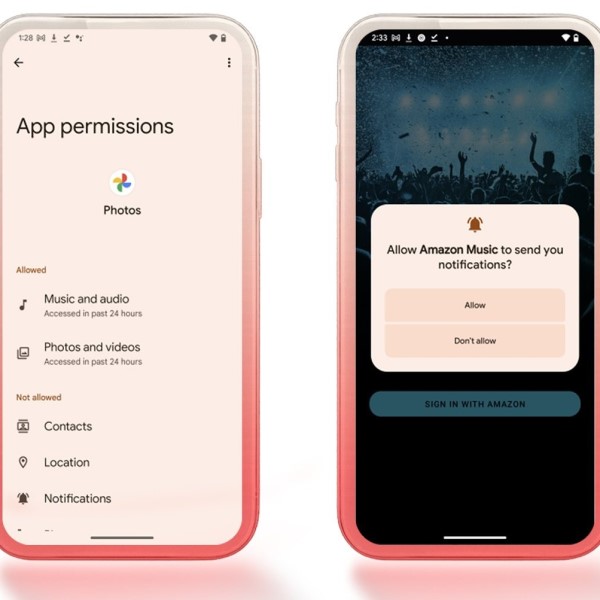
On the Android side, Google has also prioritized privacy. Recent versions of Android include a Privacy Dashboard. This dashboard shows which apps have accessed your location, camera, or microphone. Users can revoke permissions directly from this dashboard. Furthermore, Android now offers approximate location permissions. Users can give apps a general location instead of precise coordinates. This is useful for weather apps that do not need exact positioning. Therefore, Android provides granular control over data. However, Google’s business model relies heavily on advertising. While they improve user controls, they still collect more data than Apple. This creates a tension between utility and privacy.
Moreover, the handling of voice assistants differs. Siri processes much of the audio data on the device itself. This minimizes the data sent to the cloud. Google Assistant often relies on cloud processing for advanced features. While Google anonymizes this data, the risk profile is different. Additionally, web browsing privacy varies. Safari on iOS blocks cross-site tracking by default. It hides the user’s IP address from trackers.
Enterprise Security and Device Management Capabilities
Businesses have unique security requirements. They need to protect sensitive corporate data. Consequently, Mobile Device Management (MDM) capabilities are vital. This area heavily influences the android vs ios security debate for IT professionals. Apple has long been the preferred choice for enterprise security. The consistency of iOS makes it easy to manage. IT departments can enforce policies across all company devices. They can remotely wipe data if an employee loses a phone. Furthermore, Apple’s Device Enrollment Program streamlines the setup process. It ensures that every device adheres to corporate security standards from day one. The closed ecosystem minimizes the risk of data leaks. Therefore, many companies prefer issuing iPhones to their employees.
Android has made significant strides in enterprise management. Google offers Android Enterprise. This suite of tools provides robust management features. It separates work and personal data effectively. This “work profile” creates a secure container for corporate apps. Personal apps cannot access work data. This separation is crucial for BYOD (Bring Your Own Device) policies. However, the fragmentation issue persists. IT managers must manage different Android versions and skins. This complicates the security landscape. A policy that works on a Samsung phone might not work on a Xiaomi device. Consequently, the administrative overhead is higher. This complexity can lead to security gaps if not managed carefully.
Additionally, the threat of compromise differs. Corporate espionage often targets mobile devices. Sophisticated spyware like Pegasus has targeted both iOS and Android. However, the cost of developing such exploits is higher for iOS. This makes iOS a slightly harder target for high-level attacks. On the other hand, Android’s flexibility allows for deeper system integration for security apps. Enterprise security solutions can monitor system processes more closely.
Biometric Security and User Authentication Methods
Authentication is the first line of defense for a lost or stolen phone. It prevents unauthorized physical access. Consequently, the evolution of biometrics is important. Apple introduced Touch ID, a fingerprint scanner, years ago. Later, they shifted to Face ID. This facial recognition technology uses a sophisticated sensor array. It projects thousands of infrared dots onto the user’s face. It creates a detailed 3D depth map. Therefore, it is extremely difficult to fool with a photo. The data is stored locally in the Secure Enclave. It never leaves the device. This ensures that hackers cannot intercept the biometric data. Face ID also adapts to changes in the user’s appearance. This technology represents a high bar for security.
Android approaches biometrics with more variety. Many Android phones use fingerprint scanners. Some place them on the back, while others use in-display sensors. High-end Android phones now feature ultrasonic in-display fingerprint scanners. These are secure and convenient. However, many budget Android phones use optical scanners. These scanners are less secure and can sometimes be fooled. Furthermore, facial recognition on Android varies in quality. Premium phones use advanced 3D mapping similar to Apple. However, many mid-range phones use 2D camera-based recognition. This method is not secure. A simple photo can unlock the phone. Therefore, Android users must check their phone’s specifications. They need to ensure their device uses secure biometric hardware.
Moreover, the fallback mechanism matters. If biometrics fail, users typically use a PIN or password. On iOS, strong passcodes are encouraged. The system enforces delays after failed attempts. This prevents brute-force attacks. Android also offers similar features. Users can set the phone to wipe after a certain number of failed attempts. Additionally, Android offers a “Smart Lock” feature. It keeps the phone unlocked in trusted locations or when connected to trusted devices.
Google Play Protect vs. App Store Security Mechanisms
Both tech giants have built-in security scanners. They act as guardians against malicious software. Google’s solution is called Google Play Protect. It is a cloud-based and on-device scanner. It continuously scans apps installed from the Play Store and other sources. Furthermore, it can automatically remove harmful apps. This proactive approach is essential. Since Android allows sideloading, Play Protect must monitor everything. It checks billions of devices daily. It identifies potentially harmful applications (PHAs) and disables them. However, Play Protect is not infallible. Sophisticated malware can sometimes evade detection. The open nature of Android means the scanner has a harder job. It must defend against a wider variety of threats.
Apple relies on the App Store review process. This process acts as a filter before apps reach the user. Apple also has a built-in malware detection system. It checks apps for known malicious signatures. However, Apple emphasizes prevention over treatment. By blocking malicious apps from the store, they reduce the need for constant scanning. Additionally, iOS employs a strict sandboxing model. This limits the damage an app can do even if it is malicious. For example, a malicious app cannot access your contacts or photos without explicit permission. This “least privilege” model is a core security principle. It effectively contains threats.
Moreover, the response time to threats varies. Google often reacts quickly to remove apps from the Play Store. However, the apps are already on devices. They rely on Play Protect to clean up the mess. Apple’s review process catches many threats before they launch. This is a proactive defense. Furthermore, Apple revokes certificates for malicious developers. This prevents the app from running even if it was somehow installed. This remote kill switch is a powerful tool.
Conclusion: Choosing the Right Platform for Your Needs
The decision between Android and iOS is ultimately a personal one. It depends on your priorities. If you value absolute control over your device, Android is compelling. It allows for deep customization and flexibility. However, this freedom comes with added responsibility. You must manage your own security more actively. You must be careful about app downloads and updates. On the other hand, if you prioritize ease of use and safety, iOS is the clear winner. The “walled garden” protects you effectively. The strict app review process and timely updates minimize risks. It offers a secure experience right out of the box. The debate over android vs ios security highlights these fundamental trade-offs.
Furthermore, your technical expertise matters. Tech-savvy users can secure an Android phone effectively. They can install custom ROMs or advanced security software. They understand the risks of sideloading. Conversely, less tech-savvy users might prefer the guided experience of iOS. The system prevents them from making dangerous mistakes. Both platforms have matured significantly. Google has improved Android’s security posture with every release. Features like the Privacy Dashboard and file-based encryption are excellent. Apple continues to innovate with privacy labels and App Tracking Transparency. Consequently, the gap is narrowing. Both operating systems are much more secure than they were five years ago.
Ultimately, the most secure device is the one used wisely. Software cannot fix bad user behavior. Reusing passwords or clicking on phishing links endangers any phone. Therefore, regardless of your choice, you must adopt good habits. Use strong, unique passwords.