
Introduction to the DualSense Edge
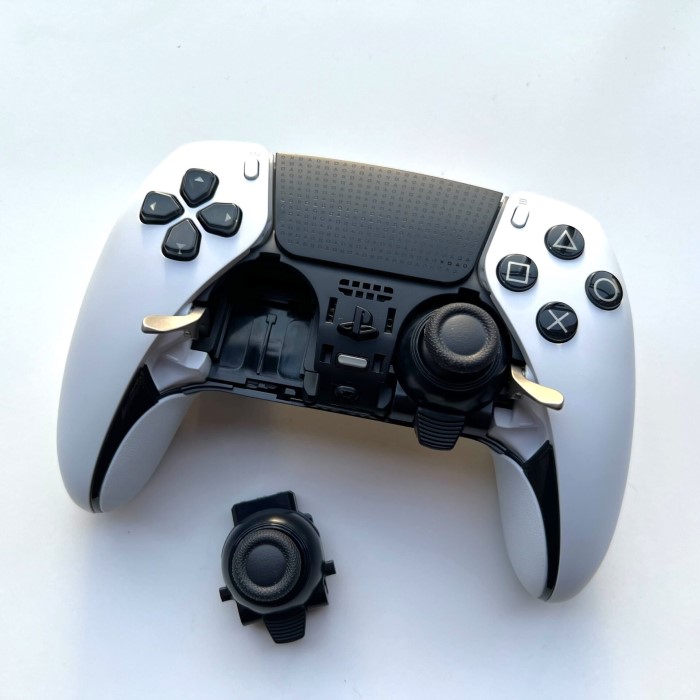
The DualSense Edge joystick replacement process may seem daunting, but it’s a manageable task for many gamers. Today, we’ll explore the reasons you might need to replace your joystick and the step-by-step approach to complete this task effectively. If your controller is experiencing drift or unresponsive buttons, a DualSense Edge joystick replacement can rejuvenate your gaming experience. In this article, we will provide detailed insights, tips, and instructions for a successful replacement.
Key Features of the DualSense Edge
- Customizable Buttons and Profiles: Players can remap buttons and save personalized profiles.
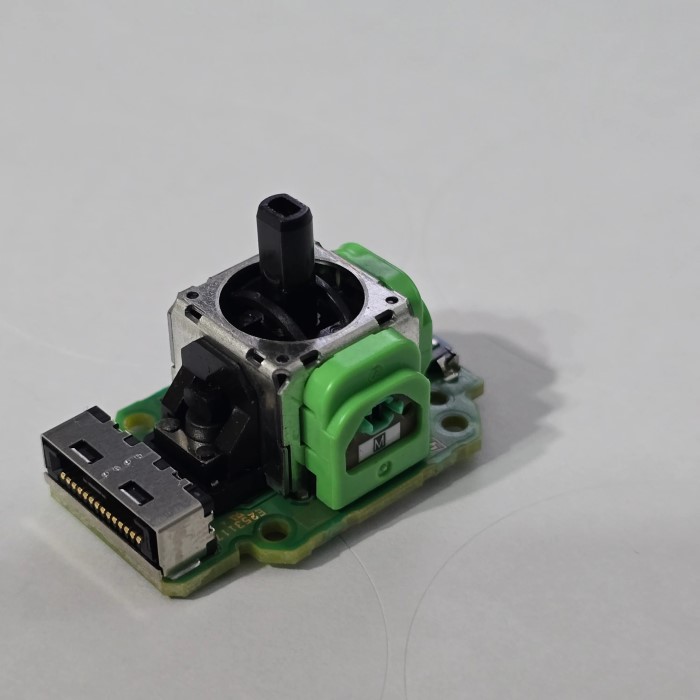
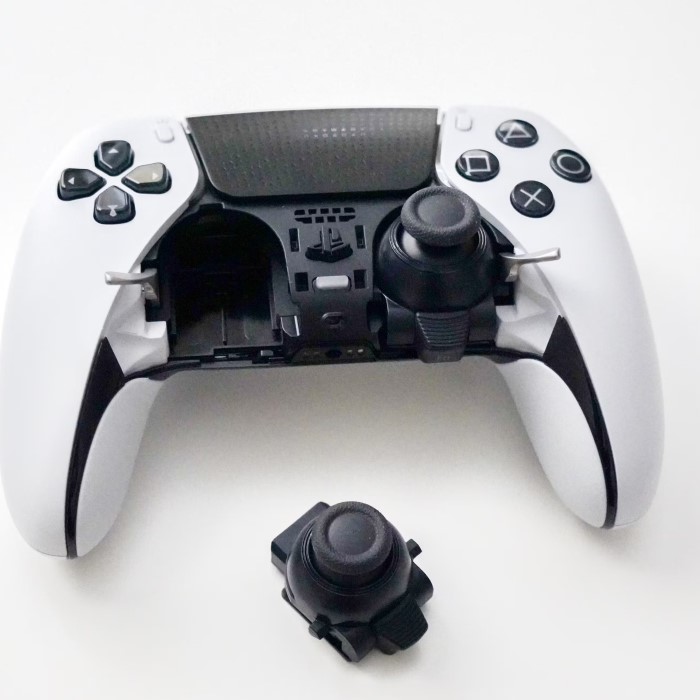
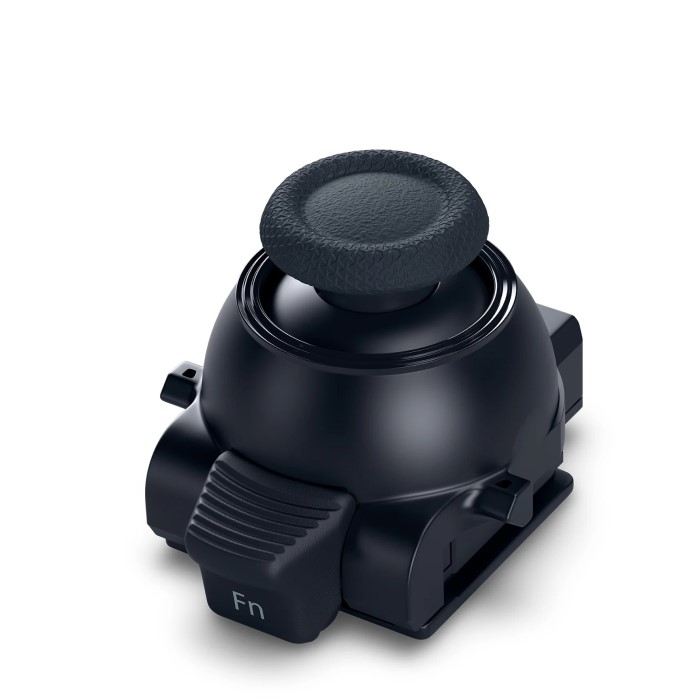
- Swappable Control Modules: Joystick modules can be easily replaced, extending the controller’s life.
- Trigger Adjustments: Adjustable trigger stops enhance control during gameplay.
- Improved Grip Design: A textured grip ensures comfort during extended gaming sessions.
- Haptic Feedback and Adaptive Triggers: Immersive feedback for a more engaging gaming experience.
Common Issues with the Joystick
- Stick Drift: Joysticks may register movement without input from the player.
- Reduced Sensitivity: The joystick may fail to respond accurately over time.
- Physical Damage: Frequent use can wear out the joystick module or its components.
- Connectivity Glitches: Rare, but possible with poor use or mishandling.
Understanding these issues helps determine if joystick replacement is necessary. Regular maintenance can also prevent major problems.
Signs That Indicate Joystick Replacement
A faulty joystick can disrupt your gaming experience. Recognizing the signs helps address issues early.
Identifying Stick Drift
Stick drift occurs when the joystick registers movement without user input. This can significantly affect gameplay precision. For example, your character may move on its own even when the joystick is not being touched. Test for stick drift by checking input accuracy in the settings menu of your gaming console. Persistent drift usually indicates that the joystick module needs replacement.
Other Performance Issues
Apart from stick drift, other issues can signal the need for joystick replacement:
Reduced Sensitivity:
-
- One common issue with joysticks is reduced sensitivity, which can significantly hinder your gaming experience.
- When your joystick fails to respond accurately or does not register inputs effectively, it can lead to frustrating gameplay, especially in fast-paced games where precision is crucial.
- This lack of response may stem from wear and tear, dust accumulation inside the joystick, or degradation of the internal components over time.
- Gamers might find themselves having to push harder or in different directions to achieve the desired outcome, leading to a less enjoyable experience and possibly impacting overall game performance.
Uneven Movement:
-
- Another problem you may encounter is uneven movement of the joystick. This feeling of jerkiness can disrupt the fluidity of controls and adversely affect gameplay.
- When the joystick does not move smoothly, it can create challenges in navigating characters or responding to in-game actions promptly.
- This issue might be caused by internal friction, debris stuck in the joystick mechanism, or mechanical failure of the gimbals that allow for movement.
- Smooth movements are essential for games that require precision, such as racing or shooting games, and any interruption in this fluidity can hinder performance.
Physical Damage:
-
- Physical damage to joystick components is another critical factor that can limit functionality.
- This damage can manifest in various forms, such as cracked casings, loose connections, or broken internal components that control movement.
- When a joystick is physically compromised, it may not function correctly, leading to missed inputs or completely unresponsive behavior.
- Regular inspection and care can help identify potential physical damage early on, allowing gamers to take appropriate measures, such as repairs or replacements, before the issue worsens.
Erratic Responses:
-
- An erratic response from the joystick is a frustrating occurrence that can lead to unpredictable behavior during gameplay.
- Users may notice random movements of their character or cursor, which can happen without any direct input from the joystick.
- This issue can stem from numerous factors, including faulty wiring, issues with the electronics, or interference from external devices.
- These erratic behaviors can be particularly troubling in competitive gaming situations, where consistent and accurate input is critical for success, potentially impacting a user’s gaming experience and performance.
When you encounter these problems, a replacement can restore your controller’s performance. Addressing these problems quickly will ensure an uninterrupted gaming experience.
Tools Required for Joystick Replacement
Before replacing your DualSense Edge joystick, gather the necessary tools. Proper preparation ensures the process runs smoothly and prevents damage to your controller.
Essential Tools and Materials
Here is a list of essential tools and materials for the replacement:
- Phillips Head Screwdriver: Needed to remove screws from the controller.
- Plastic Pry Tool: Helps to safely detach the faceplate without scratching it.
- Replacement Joystick Module: A new module compatible with the DualSense Edge.
- Tweezers or Precision Pliers: Useful for handling small components or wires.
- Microfiber Cloth: Keeps the controller clean during the process.
- Isopropyl Alcohol: Cleans the joystick area for better performance.
- Anti-Static Wrist Strap: Protects against electrostatic discharge that may damage internal components.
Ensure you have all these items readily available. Missing tools can delay the replacement process or lead to improper installation.
Precautions Before Starting
Taking precautions before diving into the replacement is crucial. Follow these tips to ensure a safe repair:
- Turn Off the Controller: Fully power down the controller to avoid electrical mishaps.
- Work on a Clean Surface: Use a clutter-free and static-free workspace to prevent accidents.
- Handle Parts with Care: Avoid forcing components as they can easily break.
- Store Small Screws Securely: Place screws in a container to keep them organized.
- Read the Instructions: Familiarize yourself with the process to minimize mistakes.
- Test the Replacement Module: Ensure the new joystick module works before installation.
By following these precautions, you can avoid damaging your controller and ensure a successful replacement. Proper preparation also speeds up the process of restoring your DualSense Edge to optimal functionality.
Step-by-Step Guide to Replacing the Joystick
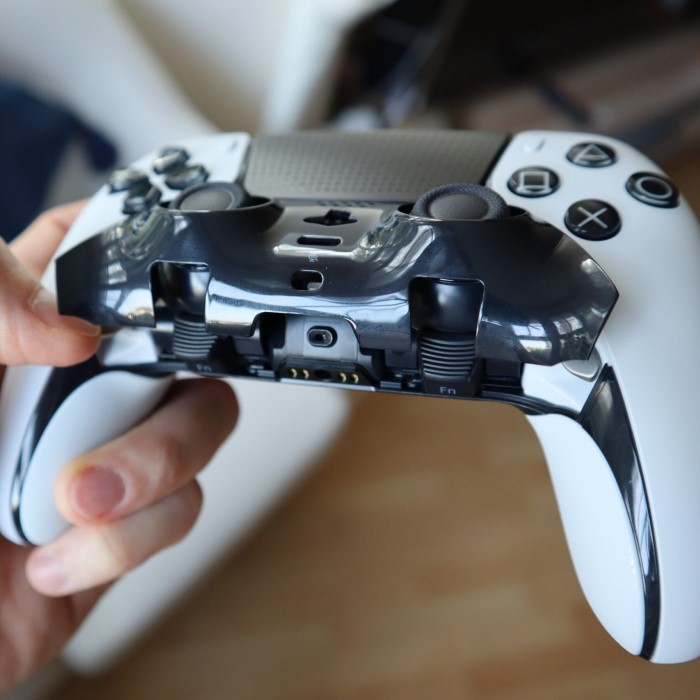
Replacing the joystick on the DualSense Edge controller can seem daunting but is straightforward with the right steps. Follow these simple instructions to restore your controller’s functionality.
Removing the Faceplate of the Controller
- Power Off the Controller: Ensure the controller is fully turned off before beginning.
- Locate the Faceplate: Hold the controller and identify the faceplate around the joysticks.
- Use a Plastic Pry Tool: Carefully insert the plastic pry tool into the seam of the faceplate.
- Gently Detach the Faceplate: Slowly work the tool around the edges to lift the faceplate. Avoid using excessive force.
- Set Aside the Faceplate: Place the detached faceplate somewhere safe to keep it clean.
Accessing and Removing the Old Joystick Module
- Locate the Joystick Modules: Find the joystick modules underneath the removed faceplate.
- Unscrew Joystick Housing: Use a Phillips head screwdriver to remove screws securing the joystick module.
- Disconnect the Joystick Wires: Carefully detach wires using tweezers or precision pliers. Note their placement for reassembly.
- Lift Out the Module: Pull the old module out gently, ensuring you don’t damage surrounding components.
Installing the New Joystick Module
- Prepare the Replacement Module: Confirm the module is compatible with the DualSense Edge controller.
- Place the New Module: Align the joystick module with connectors and slots.
- Reconnect Wires Correctly: Attach the wires back in their original placement using tweezers.
- Secure with Screws: Tighten the screws to hold the new joystick module firmly in place.
Reattaching and Testing Your Controller
- Reattach the Faceplate: Align the faceplate with the controller body and snap it back into position.
- Power On the Controller: Turn the controller on to test its functionality.
- Test the New Joystick: Check movement accuracy and response within a game or settings menu.
- Make Adjustments if Necessary: If it doesn’t work correctly, ensure all connections and screws are properly secured.
By following these steps, you’ll have a fully functional DualSense Edge joystick. Perform careful testing to ensure optimal gaming performance.
Where to Buy Replacement Parts
Finding the right replacement parts is crucial for DualSense Edge joystick replacement. Two main options are available: official Sony modules and third-party alternatives.
Official Sony Replacement Modules
Official Sony parts ensure full compatibility with your DualSense Edge controller. These modules are designed to match the controller’s specifications. Benefits of choosing Sony modules include:
- High Reliability: These modules are tested for performance and durability.
- Warranty Support: Using official parts may allow your warranty to remain valid.
- Exact Fit: Sony parts fit seamlessly into the controller design.
You can purchase Sony replacement modules directly from their official website or authorized retailers. Always double-check the product description to confirm compatibility with the DualSense Edge.
Third-Party Options and Their Pros/Cons
Third-party replacements are another choice when Sony modules are unavailable or costly. These parts can offer affordability but may vary in quality and reliability. Here are the pros and cons:
Pros:
- Cost-Effective: These modules are often cheaper than official ones.
- Availability: Easier to find online or in local stores.
Cons:
- Variable Quality: Not all third-party modules meet performance standards.
- Compatibility Issues: Some parts may not fit the controller properly.
- Warranty Risks: Your warranty might be void if you use non-Sony parts.
If you opt for third-party replacements, read reviews and choose trusted brands. Verify compatibility to ensure smooth installation and avoid performance issues.
Whether you choose official Sony parts or third-party options, ensure they meet your gaming needs. Proper research helps maintain the controller’s reliability and longevity.
Tips for Preventing Future Joystick Issues
Preventing joystick problems ensures your DualSense Edge stays functional and reliable.
Proper Maintenance Practices
- Regular Cleaning: Clean the joystick area weekly with a microfiber cloth or mild isopropyl alcohol.
- Avoid Excessive Pressure: Handle the joystick gently while gaming to minimize wear and tear.
- Check for Wear: Periodically inspect components for loose parts or mechanical issues.
- Update Firmware: Keep your controller software updated for better performance and bug fixes.
- Use Protective Covers: Install covers to reduce dust and protect the joysticks.
Consistent maintenance helps extend the life of your joystick and reduces the chance of stick drift.
Storage and Usage Guidelines
Cool, Dry Places:
-
- Proper storage of your gaming controller is essential for its longevity. Store the controller in a cool, dry place to protect it from environmental factors that could lead to deterioration.
- Moisture can cause internal components to rust or corrode, while dust can obstruct connectivity and interfere with the joystick’s performance.
- Ideally, the storage area should maintain a stable temperature and humidity level. Avoid basements or attics that may fluctuate in temperature or accumulate moisture over time.
- Using a dedicated shelf or drawer, away from heat sources and direct airflow, can help maintain a suitable environment for your controller.
Carry Cases:
-
- When transporting your controller, utilizing a protective carry case is highly recommended. A well-padded case can safeguard your device against accidental drops or impacts that may occur during travel.
- Look for cases specifically designed for gaming controllers, as they often feature compartments for cables and extra accessories, ensuring everything stays organized and secure.
- Additionally, a protective case can help prevent scratches and scuffs that could mar the appearance of the controller. Having a dedicated carry case keeps your controller and accessories safe while also adding an extra layer of convenience for gamers on the go.
Avoid Extreme Temperatures:
-
- Exposure to extreme temperatures can have detrimental effects on your controller’s performance. Keeping the controller away from direct sunlight is particularly important, as prolonged exposure can warp plastic components and degrade internal circuitry.
- Similarly, freezing conditions can negatively impact the controller’s functionality, potentially causing the battery to fail or electronics to malfunction.
- For best practices, store the controller indoors in a climate-controlled environment. When using it outside, try to minimize exposure to unpredictable weather to ensure optimal performance.
Unplug When Not in Use:
-
- To maintain the integrity of your gaming controller, it is essential to unplug it from the console when not in use. Leaving it connected, especially for long periods, can result in unexpected power drain and may lead to battery issues over time.
- Furthermore, disconnecting the controller can help prevent accidental button presses when it is idle, which could interrupt gameplay or cause the controller to become unresponsive.
- Implement a habit of unplugging your controller after each gaming session to protect its functionality and longevity.
Limit Long Sessions:
-
- Engaging in extended gaming sessions can put undue stress on your joystick mechanisms and overall controller performance. It is wise to limit the length of your gaming sessions to give your controller—and yourself—a break.
- Continuous use can result in wear and tear on sensitive components, leading to issues such as reduced sensitivity, jerky movements, or erratic responses.
- Take scheduled breaks during gaming, allowing yourself time to rest and recharge. This practice not only enhances your gaming experience but also contributes to the long-term health of your controller.
Follow these guidelines to maintain your DualSense Edge controller and prevent joystick problems in the future.
FAQs
Costs of Replacement Parts
The cost of replacement modules depends largely on whether you choose official or third-party parts. Official Sony joystick modules generally range from $20 to $30 per unit. Prices may vary slightly by region and retailer. If you opt for third-party alternatives, costs can be lower, averaging between $10 and $20. However, the quality of third-party parts can vary. Always factor in shipping fees, especially for online purchases. Research before buying to pick modules that balance affordability and reliability.
Warranty Implications
Replacing the joystick on your DualSense Edge controller can affect its warranty status. If you use official Sony parts, your warranty might remain intact, provided the controller wasn’t tampered with. Using third-party modules can void the warranty, even if the parts work well. Check your warranty terms before replacement to avoid unexpected issues. To maintain warranty coverage, consider contacting Sony’s customer support for repairs or guidance. This ensures proper handling and preserves your controller’s long-term support.
Conclusion
In conclusion, a DualSense Edge joystick replacement can greatly enhance your gaming experience. By understanding the necessity behind this process, gathering the right tools, and following a structured guide, you embrace the do-it-yourself approach, saving time and money in the long run. Your gaming gear deserves the best care, and knowing how to replace a faulty joystick can help ensure you always perform at your best. With dedication and patience, you can successfully manage this task and look forward to many more thrilling gaming sessions. Whether you are an experienced tech enthusiast or a casual gamer, this guide aims to help you make an informed decision regarding the DualSense Edge joystick replacement.
 Griley