
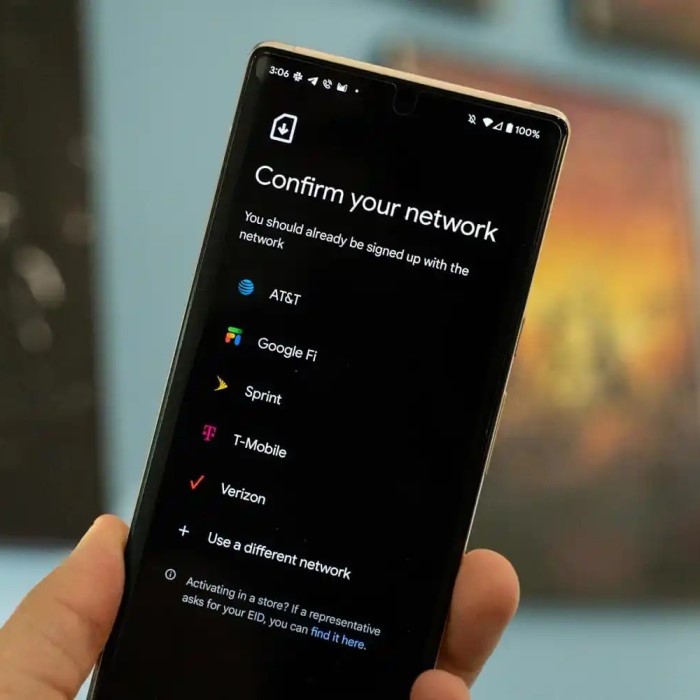
In today’s fast-paced world, staying connected while traveling has become a necessity. With network providers continually innovating, the introduction of eSIM technology has transformed how we use mobile networks. Many users, however, are left wondering, “Does Verizon support eSIM?” This article aims to answer that question while providing you with all the essential information regarding Verizon’s eSIM compatibility, activation process, pricing, and more.

What is eSIM?
Before diving into Verizon’s support for eSIM, it’s helpful to understand what eSIM technology is. An eSIM, or embedded SIM, is a digital SIM card that is built directly into smartphones and other devices. This allows users to activate a mobile plan without needing a physical SIM card.
Key Features of eSIM Technology
- Flexibility: One of the main advantages of eSIM is the ability to switch between mobile network providers without physically changing a SIM card. This is particularly beneficial for frequent travelers or those needing multiple plans.
- Multiple Profiles: eSIM technology allows users to store multiple mobile plans on a single device. You can easily switch between different network profiles directly from your device settings.
- Environmentally Friendly: By eliminating the need for physical SIM cards, eSIM technology reduces plastic waste, contributing to more sustainable practices in the telecommunications industry.
Does Verizon Support eSIM?
Does verizon support esim? Yes, Verizon does support eSIM technology! Verizon began offering eSIM support a while ago, providing customers with the option to activate a mobile plan digitally. While the concept of a digital SIM might be new to some, Verizon has made the transition as seamless as possible.
Compatibility with Devices
- Supported Phones: Various smartphone models support eSIM. Here’s a brief list of currently compatible devices with Verizon:
- Apple Devices: iPhone XR, XS, XS Max, 11, 11 Pro, 11 Pro Max, iPhone SE (2nd generation), iPhone 12 series, iPhone 13 series, iPhone 14 series.
- Android Devices: Google Pixel 3 and newer, Samsung Galaxy S20 and newer, and select models from OnePlus and Motorola among others.
- Check Your Device: It’s crucial to verify whether your device is compatible with eSIM technology through Verizon’s official website or customer support before attempting to activate.
How to Activate Verizon eSIM
Activating your eSIM with Verizon is straightforward, though it requires a few steps to ensure a successful setup. Here’s a detailed guide to activate your Verizon eSIM:
Step 1: Sign Up for an eSIM Plan
- Purchase Your eSIM Plan: Before activation, you’ll need to sign up for an eSIM plan through Verizon. You can do this via:
- My Verizon App: Download the app, log into your account, and navigate to the section for changing your device or plan.
- Online Portal: Visit the Verizon website, log in, and complete the necessary steps to get your eSIM plan.
- Receive QR Code: Once your eSIM plan is purchased, Verizon will provide a QR code via email or through the app. This QR code is crucial for activating your eSIM.
Step 2: Download the eSIM Profile
To download your eSIM profile, follow these steps:
Access Settings
To begin the eSIM activation process, the first step is to access the settings on your compatible device. Follow these detailed instructions:
- Finding Device Settings: Locate the settings icon on your device’s home screen. This icon usually looks like a gear or wrench. Tapping on it will open the main settings menu where you can adjust various configurations.
- For iPhone Users: If you’re using an iPhone, once you’ve accessed the settings, look for the Cellular option. Tap on it to access cellular data settings and options related to your mobile plans.
- For Android Users: If you own an Android device, the steps will be slightly different. Navigate to Network & Internet in the settings menu. This section is where you can manage your Wi-Fi, data, and mobile network settings.

Add Cellular Plan
After you have accessed the appropriate settings for your device, the next step is to add the cellular plan for your eSIM. Here’s how to do that:
- Select the Appropriate Option: In the cellular settings on your iPhone or the network settings on your Android device, look for the option labeled “Add Cellular Plan” or similar wording, depending on your device version.
- Initiate the Setup: Once you tap on “Add Cellular Plan,” your device will prompt you with instructions or options to proceed with adding the new profile. Make sure to have your Verizon QR code ready, as you will need it to continue.
- Choose QR Code Scan Option: After selecting “Add Cellular Plan,” your device will provide various methods to add the plan. Opt for the option that allows you to scan a QR code, which is a common method for eSIM activation.
Scan the QR Code
This step is crucial for downloading your eSIM profile associated with your Verizon account. Here’s how to correctly scan the QR code:
- Access Your Camera: Open your device’s camera app. Many smartphones automatically activate scanning features when the camera is pointed at a QR code.
- Position the QR Code: Hold your device steady and align the camera with the QR code provided by Verizon. Ensure that the QR code is clearly visible within the camera’s viewfinder for the best scanning results.
- Scan the Code: Your device should automatically recognize the QR code. Once scanned, a notification will typically pop up, prompting you to confirm that you want to download the eSIM profile associated with your Verizon account.
- Confirm Download: After scanning, follow any on-screen prompts to download and install the eSIM profile. This action will link your new eSIM to your Verizon account, readying it for use.
- Ensure Success: After successful scanning and downloading, you’ll usually see a confirmation message indicating that the eSIM profile has been added. You may have to finalize some configurations to activate data usage.

Step 3: Activate Your eSIM
After the QR code has been scanned successfully:
- Finalize Activation: Following the prompts on your device, complete the installation of your eSIM profile. During this process, you may be asked to set this eSIM as your primary data source.
- Confirm Data Settings: Navigate back to Settings > Cellular, and ensure that your newly added eSIM plan is configured accordingly. You may want to set it as your default line for data usage.
- Test Connectivity: Once the eSIM is activated, test it by browsing the web or using apps that require a data connection.
Costs Associated with Verizon eSIM
Understanding the financial implications of activating an eSIM with Verizon is essential. The costs can vary based on several factors. Let’s break them down:
- Cost of eSIM Activation: Generally, activating an eSIM does not incur any additional activation fees. It is similar to switching from one physical SIM to another in that regard.
- Monthly Plan Costs: The primary cost comes from the mobile plan you select. Verizon offers various postpaid and prepaid plans that cater to different user needs, such as data limits and contract timelines.
- Switching from Physical SIM: Existing Verizon customers can switch from a physical SIM to an eSIM without extra charges related to the switch itself.
Potential Disadvantages of Verizon eSIM
While eSIM technology has its high points, there are several downsides to consider as well:
- Device Compatibility Limitations: Not every smartphone supports eSIM capabilities, so users might need to consider upgrading their devices if their current one isn’t compatible.
- Complexity for Non-Tech-Savvy Users: For customers less comfortable with technology, managing eSIM profiles and settings can be a bit daunting. They may prefer the simplicity of traditional SIM cards.
- Issues During Activation: Occasionally, users may experience problems during the activation process, such as network issues or scanning problems. While these can usually be resolved, it requires additional time and troubleshooting.
What Carriers Support eSIM Technology?
As eSIM technology gains traction, more carriers are starting to support it. Here are some prominent telecommunications companies that have embraced eSIM:
- AT&T: Similar to Verizon, AT&T has rolled out substantial support for eSIM in various devices.
- T-Mobile: T-Mobile is known for its embrace of innovative technologies and has comprehensive eSIM support.
- Sprint: Following T-Mobile’s acquisition of Sprint, the latter’s support for eSIM has expanded, offering a range of options for users.
- International Carriers: Many carriers outside of the USA also provide eSIM options, allowing seamless transitions for international travelers.
Conclusion
Does verizon support esim? In summary, Verizon does indeed support eSIM technology, making it easier than ever for customers to stay connected. With features designed to enhance your mobile experience, eSIM allows for flexibility, convenience, and environmentally sustainable practices. As a user, you can activate your Verizon eSIM with straightforward steps, enabling you to manage your mobile plan with ease.
By staying informed about the activation process, costs, and the advantages of eSIM technology, you are empowering yourself to make the best decisions for your connectivity needs. The world of eSIM represents a significant evolution in telecommunications, and knowing whether Verizon supports eSIM helps you navigate this digital shift smoothly. Embrace eSIM technology and enjoy a hassle-free mobile experience!