

Introduction
In today’s fast-paced digital world, having efficient and versatile equipment is crucial. One such device that has gained popularity is the Thunderbolt 4 docking station. This all-in-one solution combines functionality with innovative technology, making it a must-have for professionals and tech enthusiasts alike. With its advanced features, it provides seamless connectivity, fast data transfer, and the ability to power multiple devices simultaneously. In this article, we will explore the ins and outs of Thunderbolt 4 docking stations, focusing on their benefits, features, and why they are indispensable for modern workspaces.

What is Thunderbolt 4?
Thunderbolt 4 is the latest iteration of Intel’s Thunderbolt technology, delivering a powerful combination of performance, versatility, and compatibility. It offers the following key advantages:
- High-Speed Data Transfer: Thunderbolt 4 supports data transfer rates of up to 40 Gbps. This high-speed capability allows you to transfer large files quickly and efficiently.
- Universal Compatibility: Thunderbolt 4 is compatible with USB4, Thunderbolt 3, and USB-C devices. This universal compatibility simplifies the connection of various peripherals, avoiding the need for multiple ports or adapters.
- Support for Multiple Displays: With Thunderbolt 4, you can connect up to two 4K displays or one 8K display. This feature enhances productivity for users who require extensive screen real estate.
- Power Delivery: Many Thunderbolt 4 docking stations support power delivery, allowing you to charge your laptop or other devices through the same connection. This eliminates the clutter of multiple cables and dedicated power adapters.
Benefits of Using
Improved Connectivity Options
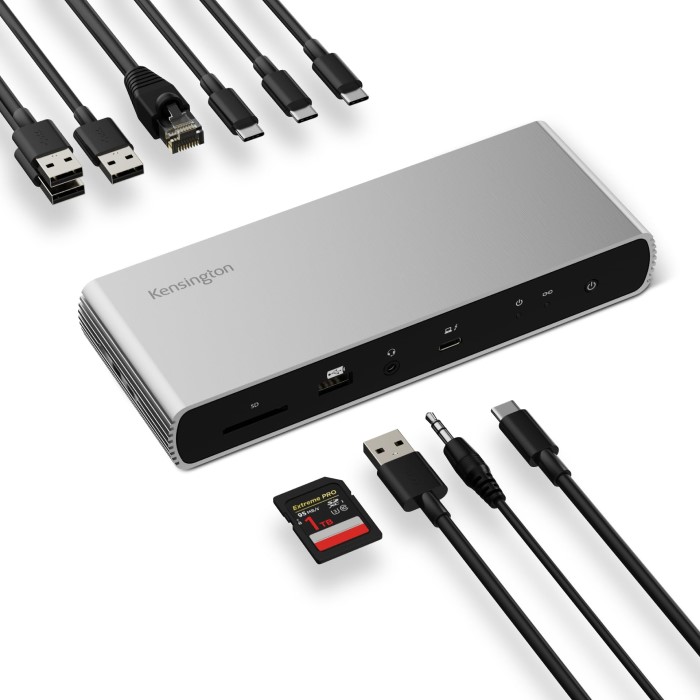
One of the most significant advantages of a Thunderbolt 4 docking station is its ability to provide a wide array of connectivity options. With multiple ports, you can connect various devices easily:
USB-A and USB-C Ports
- Multiple Connectivity Options: Most docking stations come equipped with multiple USB-A and USB-C ports. These diverse connections enable users to connect a wide variety of devices seamlessly.
- Connect Traditional Devices: The inclusion of USB-A ports allows you to easily connect traditional USB devices like keyboards, mice, and flash drives. This backward compatibility ensures you can continue using your existing peripherals without hassle.
- Support for Modern Gadgets: USB-C ports cater to newer devices, including smartphones, tablets, and laptops. This modern connectivity supports fast charging and high-speed data transfer, making it ideal for today’s tech users.
- Convenience of Mixed Ports: The combination of USB-A and USB-C ports offers enhanced flexibility. You can mix and match connections to meet your specific needs, facilitating multitasking and improving workflow efficiency.
HDMI and DisplayPorts
- Connect External Monitors: Many Thunderbolt 4 docks feature HDMI or DisplayPort outputs. These outputs allow you to connect external monitors easily, significantly boosting your productivity.
- Multi-Screen Setup: Using multiple monitors enhances your workflow by providing extra screen real estate. This setup is especially beneficial for graphic designers, videographers, and professionals who need to view and edit content simultaneously.
- High Resolutions Supported: Most HDMI and DisplayPort outputs support high resolutions, enabling you to enjoy crisp visuals on larger screens. This capability makes Thunderbolt 4 docks perfect for detailed graphic work or high-definition video playback.
- Easy Plug-and-Play Functionality: Connecting external monitors usually requires minimal setup. Users can quickly plug in their HDMI or DisplayPort cable and start working without complicated configurations.
Ethernet Port
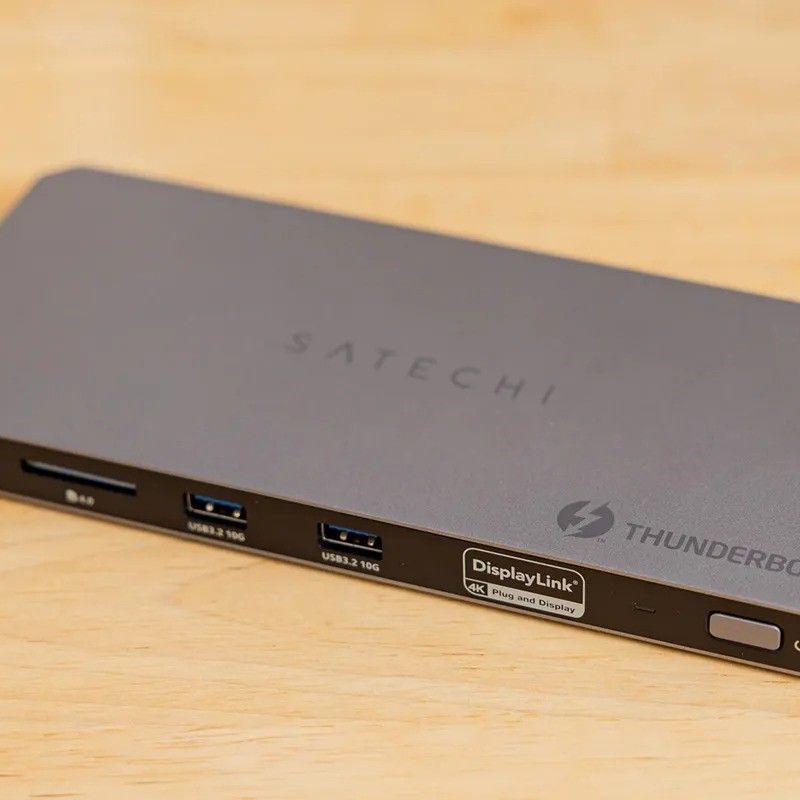
- Stable Internet Connectivity: A reliable Ethernet connection is crucial for stable internet access, especially in professional settings. Thunderbolt 4 docking stations often include an Ethernet port for this purpose.
- High-Speed Internet Access: By providing an Ethernet port, these docking stations ensure high-speed internet connectivity. This is particularly valuable in areas where Wi-Fi signals are weak or unreliable.
- Improve Online Workflows: With a stable Ethernet connection, users can engage in activities such as video conferencing, online gaming, and large file transfers without interruptions or lag.
- Plug and Play Convenience: Connecting to Ethernet is straightforward. Simply plug the Ethernet cable into the docking station and enjoy immediate access to stable and fast internet, making it an essential feature for remote work scenarios.
Enhanced Productivity
Using a Thunderbolt 4 docking station can significantly boost your productivity, allowing you to accomplish more tasks in less time:
- Single-Cable Solution: With a single Thunderbolt 4 cable connecting your laptop to the docking station, you gain instant access to multiple peripherals. This straightforward setup reduces clutter and streamlines your workspace.
- Seamless Device Switching: Easily switch between devices by connecting new peripherals to the docking station without needing to unplug and replug multiple cables.
- Faster File Transfers: Thanks to Thunderbolt 4’s high-speed capabilities, moving large files becomes a quick and hassle-free process, saving you valuable time during peak work hours.
Key Features of Thunderbolt 4 Docking Stations
Port Configuration
When considering a Thunderbolt 4 docking station, take note of the port configuration. Most models will include:
- USB Ports: Look for a mixture of USB-A and USB-C ports to ensure compatibility with a range of devices.
- Video Outputs: HDMI or DisplayPort outputs are essential for connecting external monitors.
- Power Input: Ensure your docking station has at least one port for power delivery to charge your laptop.
Build Quality and Design
- Durability: Choose a docking station made from high-quality materials to withstand daily use. A rugged construction will ensure longevity, especially if you travel frequently.
- Compact Design: Consider the size and weight of the docking station. A compact design helps maintain a clutter-free workspace and makes it easy to transport during travel.
Additional Features
Cable Management
- Built-In Solutions: Some docking stations come with integrated cable management features designed to keep your workspace tidy. These solutions help you organize various cables, preventing them from tangling or cluttering your area.
- Improved Workspace Aesthetics: By utilizing cable management systems, you can create a cleaner, more streamlined workspace. This not only enhances the appearance of your desk but also contributes to a more focused working environment.
- Easier Access: Organized cables mean easier access to the connections you need most. You won’t have to fumble through a mess of cords to find the right one, facilitating a more efficient workflow.
- Reduced Wear and Tear: Proper cable management can minimize wear and tear on your cables. By preventing them from bending excessively or being accidentally yanked, you can extend the lifespan of your cables and devices.
Integrated SD Card Reader
- Convenient File Transfers: If you work with photography or videography, an integrated SD card reader makes file transfers hassle-free. You can quickly and easily transfer photos or videos from your camera directly to your computer, saving you time.
- Eliminate Extra Devices: Having an integrated SD card reader avoids the need for additional external card readers. This simplifies your workflow and reduces the number of devices you need to carry, keeping your setup compact.
- Compatibility with Various Formats: Most built-in SD card readers support multiple formats, allowing you to work with different types of memory cards. This diversity accommodates various cameras and devices, enhancing your versatility in handling files.
- Streamlined Workflow: With quick access to your files, you can jump straight into editing or organizing your content. This streamlined workflow helps you stay productive, especially during busy shoots or tight deadlines.
Advantages of USB-C Hubs
Many Thunderbolt 4 docking stations also function as USB-C hubs. This combination provides several additional advantages:
Affordability
- USB-C hubs generally come at a lower price point compared to full-fledged docking stations.
- This affordability appeals to users who need basic connectivity options without breaking the bank.
- Many budget-conscious consumers choose USB-C hubs to meet their everyday connection needs without sacrificing quality.
- The cost-effectiveness of these hubs allows more users to access essential technology, thereby increasing their popularity.
Portability
- USB-C hubs usually feature a compact and lightweight design, making them easy to transport.
- Their small size makes them an ideal choice for frequent travelers or individuals working in tight spaces.
- Users can easily slip a USB-C hub into their laptop bag or pocket, ensuring they stay connected on the go.
- This portability enhances their usability in various situations, from working at coffee shops to setting up temporary office spaces.
Versatile Compatibility
- Most USB-C hubs boast broad compatibility with various devices, including laptops, tablets, and smartphones.
- This versatility makes them suitable for multiple contexts, whether at work, home, or during leisure activities.
- Users can quickly connect different peripherals, such as monitors, keyboards, and external storage, without worrying about compatibility issues.
- The ability to easily switch between devices encourages users to take advantage of their USB-C hubs in diverse scenarios.

Frequently Asked Questions
Are Thunderbolt 4 docks worth it?
Yes, Thunderbolt 4 docks provide substantial benefits, including high-speed data transfer, multiple display support, and universal compatibility. They significantly enhance productivity by simplifying device connectivity.
Does Thunderbolt 4 support docking stations?
Yes, Thunderbolt 4 specifically supports docking stations. It provides robust connectivity and high speeds, making it an ideal choice for various peripherals.
Can I plug a USB-C into a Thunderbolt 4?
Absolutely! Thunderbolt 4 is backward compatible with USB-C devices. You can connect USB-C peripherals without any issues, allowing for versatile use.
What is the difference between Thunderbolt 4 and Thunderbolt 5 docks?
Thunderbolt 4 offers a maximum speed of 40 Gbps and compatibility with USB4, whereas Thunderbolt 5, which is on the horizon, is expected to introduce even higher speeds and enhanced features. However, specific details about Thunderbolt 5 are still emerging.
Conclusion: The Best Choice for Your Setup
In conclusion, a Thunderbolt 4 docking station paired with a USB-C hub presents an all-in-one solution for your connectivity needs, especially for outdoor or remote work setups. These docking stations enhance productivity through streamlined connectivity, versatile ports, and high-speed performance.
As you prepare for your next adventure or optimize your workspace, consider the importance of a reliable Thunderbolt 4 docking station. By investing in this technology, you are equipping yourself with the tools necessary to work efficiently and effectively, no matter where you are. Whether you are a professional, a student, or an outdoor enthusiast, a Thunderbolt 4 docking station will be a valuable addition to your tech arsenal. Embrace the future of connectivity and elevate your experience today!